Piano Music Heart: Pop Tiles
- 4.8
- Rating
- 10.00M
- Installs
- Free
- Price
 Analysis by App-foxy
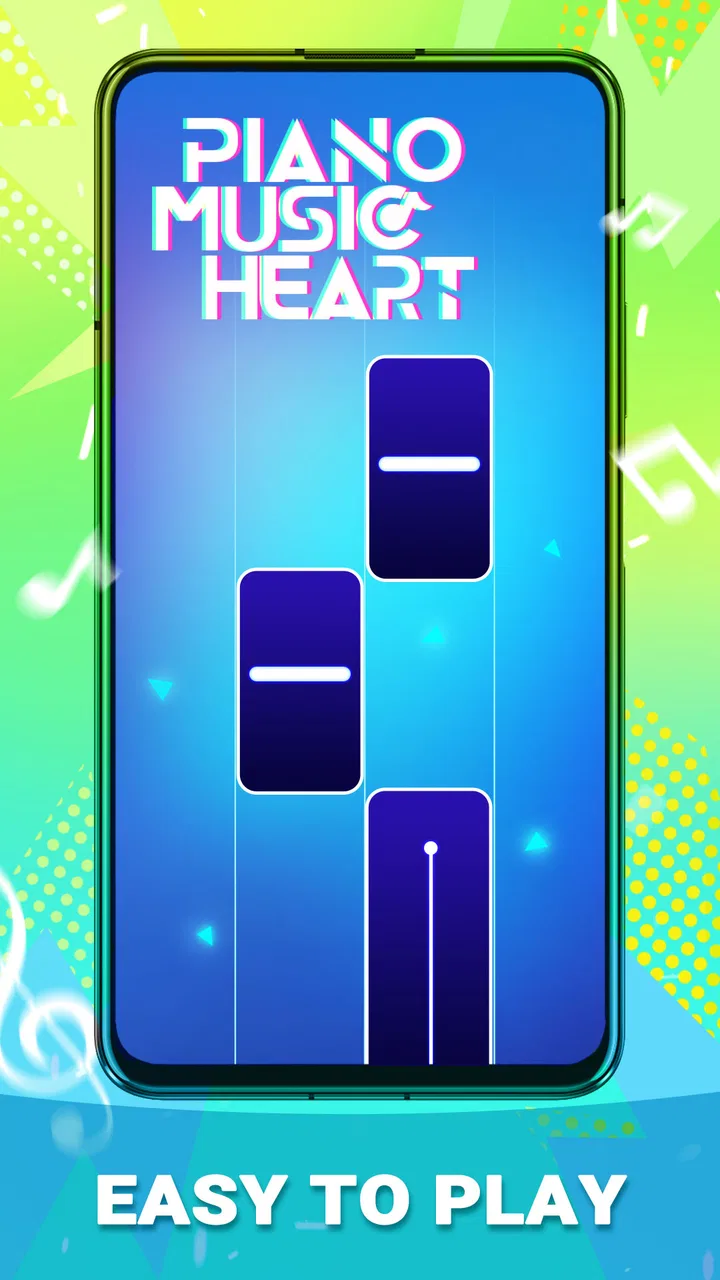
I approached Piano Music Heart: Pop Tiles expecting a simple music game, and that is exactly where it makes the most sense. It is a free Android title from CodiPlayer, built around tapping through piano-style songs rather than learning piano technique or managing a large strategy system. The appeal is immediate: choose a track, follow the moving notes, and try to stay with the rhythm. For a first-time player, the important thing is not to treat it like a serious instrument tutor. I found it more useful as a quick, focused game for short breaks, especially when I wanted something musical without committing to a long session.
What the first session feels like
The game sits in the music category, but its real identity is closer to a reflex challenge with a piano presentation. The screen asks me to watch the notes and respond at the right moment. That creates a small but satisfying loop: listen, observe, tap, recover from mistakes, and try again with better timing. The store summary points toward pop songs associated with 2025, while the short description presents the experience as “Piano Music Heart.” In practice, I would describe it to a friend as a casual pop-song tapping game with a piano theme.
That distinction matters because it sets the right expectations. Someone looking for sheet music, chord lessons, a virtual keyboard, or a way to record original performances should choose a different kind of app. This game is about reacting to a sequence, not controlling every note of a song. I enjoyed that limitation because it keeps the first few minutes approachable. There is no need to understand music theory before playing, and a person who has never touched a piano can still understand the basic objective almost immediately.
You May Also Like

 Blood Strike: 2.5 Anniversary
Blood Strike’s Loadouts Turn Every Drop Into a Tactical Gamble
A close look at Blood Strike’s custom loadouts: how fast access to signature weapons reshapes its battle royale rhythm, rewards preparation, and narrows the gap between fights.

 Pandora - Music & Podcasts
Pandora’s Music Is Easy to Start, but Harder to Recover
Pandora’s strength is its low-effort path from a seed to a station. Its weak spot is how much confidence it asks you to place in connection, setup, and quiet recovery.

 8 Ball Pool
 Is Built on Rivalries, Rematches, and Routine
A close look at the rivalries, rematches, shared routines, and unanswered safety questions that turn a quick pool match into a persistent mobile community.

 Samsung Music
’s Quiet Strength Is Playing What You Already Own
Its reach comes less from spectacle than from dependable access to a personal library. That simplicity is both the app’s strongest retention engine and its ceiling.

 AccuWeather: Weather Radar
AccuWeather Review: A Quick, Clear Forecast for Everyday Decisions
For everyday plans, the best forecast is the one you can understand quickly. AccuWeather makes rain timing, radar, and local conditions easy to act on, with a few trade-offs.

 Hill Climb Racing
Why Hill Climb Racing Still Turns Crashes Into One More Run
A tiny car, a bumpy hill and one more upgrade: Hill Climb Racing keeps resurfacing because its simple chaos makes every near-miss feel personal.
More From Our News Desk



The game is rated for Everyone, which matches its accessible presentation. I would be comfortable suggesting it to a younger player who enjoys rhythm games, although an adult should still judge whether repeated tapping and fast visual movement suit that individual. It is also a useful pick for casual players who do not want a complicated account-building routine before reaching the actual game. The free price removes the biggest barrier to trying it, so the decision is mainly about whether this particular piano-tile format fits your taste.
CodiPlayer released it on December 26, 2022, and the current version is 1.0.28. It requires Android 6.0 or later, which makes it available to people using older compatible Android devices as well as newer phones. Its reach is substantial, with over five million installs, but I would not use that figure as a promise that it will suit everyone. A large audience tells me that the basic idea is easy to understand; it does not replace a personal test of the controls, song selection, or pacing.
Getting from installation to the first useful result
My advice for a first launch is to keep the first attempt deliberately simple. Do not begin by chasing a perfect run or trying to prove that you can react to the fastest sequence. Start by learning how the notes are arranged on your screen. Watch the path for a few seconds, identify where the next tap is likely to appear, and use the first song as a calibration period for your eyes and fingers. The meaningful first success is not a high score. It is completing a short passage while staying calm enough to follow the rhythm.
That approach makes a noticeable difference. New players often look at the whole screen and become tense when several notes appear close together. I found it easier to focus on the next immediate target while listening for the beat underneath it. The music gives the visual movement a sense of direction, but I would not rely on sound alone. If the phone is in a noisy room, or if you are playing quietly, the visual timing still has to carry most of the experience.
A practical everyday scenario is a short wait before an appointment. I can open the game, play a song or two, and stop without needing to remember a complicated storyline or rebuild a team. That makes it more convenient than many larger rhythm games when I only have a few minutes. It also works as a light warm-up for hand-eye coordination: one attempt to settle in, another to correct the places where I rushed, and then I can put the phone away.
For the first successful action, I recommend choosing a song that feels comfortable rather than the one that sounds most impressive. Keep your taps small and controlled. Large finger movements make it harder to move toward the next note, particularly when the sequence changes direction. I also try to hold the phone in a stable position instead of shifting it between hands during a run. These are simple habits, but they help separate a genuine timing problem from a control problem caused by an awkward grip.
How I handle mistakes and repeated attempts
The most enjoyable part of the design is the short feedback loop after a mistake. I can immediately see that my timing or attention broke down, then try again while the memory is still fresh. That makes the game feel more like practice than punishment. Still, repetition can become tiring if I keep replaying one difficult passage without changing anything. When that happens, I stop for a moment, relax my hand, and return with the goal of reaching the problem area cleanly rather than forcing a complete run.
One useful technique is to divide a song mentally into small landmarks. I pay attention to a change in movement, a denser group of notes, or a section where my tapping hand tends to hesitate. Instead of thinking, “I must finish the whole song,” I focus on surviving the next landmark. This reduces the pressure that causes premature taps. It is a small adjustment, but it turns a vague feeling of failure into something I can diagnose.
I also found that playing immediately after a poor attempt can be misleading. Sometimes the issue is not skill but attention. If I am answering messages, watching television, or trying to play while walking, the visual sequence becomes much harder to read. The game is casual, but its timing still rewards a little concentration. A quiet minute with the phone held steadily is usually more productive than several distracted attempts.
For players who use accessibility-related display settings or have difficulty distinguishing fast visual movement, the piano-tile format may demand extra effort. I would test it in a comfortable environment before deciding whether it is suitable. The game’s simple premise does not automatically make every sequence easy to see or every interaction comfortable. That is one reason I see it as a focused reflex game rather than a universally relaxing music app.
Confusions a new player may have
The first common confusion is assuming that the game teaches real piano playing. It does not replace lessons or a keyboard app. The notes are presented as targets to tap, so success depends on timing and visual tracking. This is good news if you want a low-pressure rhythm challenge, but it is a poor match if your goal is to understand scales, read notation, practice finger independence, or play a melody freely.
A second confusion is expecting the music to behave like a normal streaming playlist. I would not install this primarily to listen passively to pop songs. The music is part of the interaction, and the player’s attention belongs on the sequence. If you want background listening, a music service is more practical. If you want an active game that gives your hands something to do while familiar pop styling supplies the atmosphere, this title is the more relevant choice.
There is also a difference between making progress and simply playing longer. Repeating a track without observing where your timing slips can create a frustrating loop. I suggest identifying one specific issue before each retry: tapping early, losing the next target after a direction change, or gripping the phone too tightly. That turns each attempt into a small experiment. It is one of the best ways to get value from a game whose core interaction is intentionally easy to learn.
Another point worth understanding is that a free game can still ask for your patience. The absence of a purchase price makes experimentation easy, but it does not guarantee that every player will enjoy the pacing or presentation. If you dislike repeated attempts, visual pressure, or music games that test reaction speed, the free download will not change that fundamental mismatch. I would rather be clear about this than recommend it to someone who normally prefers calm puzzles or long-form adventures.
Where it fits beside other music games
Compared with a virtual piano, this game offers less freedom but a clearer challenge. A virtual piano lets me choose keys and explore sounds; Piano Music Heart gives me a defined sequence and asks me to follow it accurately. Compared with a rhythm game built around elaborate characters, stories, collections, or competitive systems, it feels more direct. I can concentrate on the song-and-tap relationship without needing to learn a wider game economy first.
That simplicity is both its strongest advantage and its main limitation. I like it when I want a quick activity with an obvious objective. I would choose a fuller rhythm game if I wanted long-term progression, social competition, extensive customization, or a more demanding performance system. I would choose a piano-learning app if I wanted skills that transfer to an actual keyboard. The right comparison is not “which app is best?” but “do I want musical interaction, musical practice, or musical entertainment?” This title is firmly in the interaction-and-entertainment space.
The pop focus gives it a more immediate feel than an abstract metronome exercise. Familiar song styling can make the timing easier to stay engaged with, especially for players who lose interest in purely mechanical tapping. At the same time, anyone who wants a broad exploration of classical, electronic, regional, or user-created music may find the concept narrower than a general rhythm platform. I would install it for the specific mood it offers, not as my only music game.
Small habits that improve the experience
I recommend lowering the pressure of the first few sessions by treating them as observation runs. On the first attempt, notice how quickly the sequence moves and where the screen becomes visually busy. On the second, adjust your hand position and focus on the earliest point where you made a mistake. This is more effective than immediately repeating the same movement with the same tension. The game’s accessible controls make experimentation easy, so use that simplicity to refine your approach.
Another helpful habit is to avoid playing with a finger that is already tired from extended phone use. Fast taps can feel clumsy when the hand is tense, and it is easy to blame the game for an issue caused by fatigue. I prefer a relaxed fingertip and a stable phone, with my attention slightly ahead of the current note rather than fixed on the one I just tapped. Looking ahead is especially useful when a sequence changes direction quickly.
For a child or a new player, I would demonstrate one complete attempt without interrupting to correct every tap. Let the player see the basic rhythm first, then discuss one improvement afterward. Too much advice during the run can make a simple game feel like a test. For an experienced rhythm-game player, the opposite may be true: begin by checking the visual speed and input feel, then decide whether the available challenge is deep enough to hold your attention.
If you are using an older Android phone that meets the minimum requirement, I would close distracting apps before playing and keep the device steady. I am not presenting that as a guaranteed performance fix, but it is a sensible way to reduce avoidable interruptions during timing-based play. Since the game depends on seeing and responding promptly, a comfortable screen position and an undisturbed hand matter more here than they would in a turn-based game.
Who should install it, and who should skip it
I think it is a good fit for someone who wants a free, approachable music game that can be understood in a minute and enjoyed in short sessions. It is especially suitable for casual Android players, fans of piano-tile concepts, and people who like improving through repeated attempts without needing a large story or complicated controls. The Everyone rating also makes it a reasonable family-friendly option in principle, provided the individual player is comfortable with quick visual movement and repeated tapping.
I would steer away from it if your main goal is learning piano. The game may help you pay attention to timing, but that is not the same as practicing an instrument. I would also skip it if you want a passive listening tool, a deep competitive ladder, or a large social experience. Those expectations point toward different categories of apps. Its value comes from the narrowness of the loop: music supplies the mood, and the player supplies the concentration.
My final recommendation is to give it a short, focused trial rather than judging it from the first missed sequence. Begin with a comfortable song, keep the phone stable, and aim to complete one clean passage instead of chasing perfection. If that small success feels satisfying, the game has probably found its audience in you. If the tapping feels repetitive or the visual pace becomes stressful, there is little reason to force it simply because it is free.
After using it, I see Piano Music Heart: Pop Tiles as a straightforward pick for quick pop-themed rhythm play, not as a piano simulator or a full music-learning tool. CodiPlayer keeps the central idea easy to reach, and the current 1.0.28 version remains accessible on Android 6.0 and later. For me, its best use is a few attentive minutes between everyday tasks, where a simple musical challenge is more appealing than a demanding game. The key is to install it for rhythmic tapping, not for piano instruction; with that expectation, it is much easier to decide whether the experience belongs on your phone.
FAQs for Piano Music Heart: Pop Tiles
01What is Piano Music Heart: Pop Tiles, and how does it work?
Piano Music Heart: Pop Tiles is an engaging music game where players tap on the black tiles as they appear on the screen, synchronized with the rhythm of popular songs. The goal is to keep the music playing by accurately tapping the tiles without missing any to achieve high scores and unlock new tracks.
02Is Piano Music Heart: Pop Tiles free to play?
Yes, Piano Music Heart: Pop Tiles is free to download and play on both Android and iOS devices. However, the game may offer in-app purchases for additional features, ad-free experiences, or access to premium content, which can enhance the gaming experience.
03What types of music can I expect to play in the game?
The game features a wide variety of popular songs spanning different genres, including pop, rock, classical, and more. Regular updates often introduce new tracks, ensuring players have fresh content to enjoy and challenge themselves with a diverse musical repertoire.
04Can I play Piano Music Heart: Pop Tiles offline?
Yes, Piano Music Heart: Pop Tiles can be played offline, allowing users to enjoy the game without an internet connection. However, certain features, such as downloading new songs or participating in online leaderboards, will require an internet connection.
05How can I improve my skills in Piano Music Heart: Pop Tiles?
Improving your skills in Piano Music Heart: Pop Tiles involves practicing regularly to enhance your hand-eye coordination and timing. Starting with easier songs and gradually progressing to more challenging tracks can help. Watching tutorials and learning from top players can also provide valuable tips and strategies.
Pros
- Engaging gameplay with popular songs
- Smooth and responsive touch controls
- Regular updates with new tracks
- Visually appealing interface
- Offline mode available for play
Cons
- Contains ads that interrupt gameplay
- Limited free songs without purchase
- In-app purchases can be costly
- Requires internet for daily updates
- Battery consumption can be high

Piano Music Heart: Pop Tiles
Gallery